
godot-mcp-bridge
An AI that works with you in the Godot editor — not instead of you.
Every Godot MCP server lets an AI drive the editor. This one also tells the AI what you just did — the scene you opened, the node you selected, the file you saved — so you can both work in the same project at the same time without stepping on each other. Add a real step-debugger, scope-aware refactoring through Godot's language server, live-tree edits that never clobber your unsaved work, and 231 tools that were each verified against a running editor rather than just written.
Started as a fork of tomyud1/godot-mcp (MIT
licensed) and has since diverged substantially — see CHANGELOG.md.
💬 What you'd actually say to it
"The player falls through the floor sometimes. Set a breakpoint in
_physics_processand tell me whatvelocityis when it happens."
"Build me an enemy: CharacterBody2D, circle collider, sprite, patrol script, and put it in the
enemiesgroup."
"Run the game, press jump, screenshot it, and tell me if the animation played."
"Which of my resources aren't referenced by anything anymore?"
"Export a Windows debug build and tell me when it's done."
Under the hood that's a breakpoint hit read from a paused frame, a scaffolded scene tree, a runtime input + screenshot loop, a dependency sweep, and an async headless build — but you don't have to know which tool does which.
// debug_launch({scene: "res://scenes/level.tscn"})
{ "state": "stopped", "stopped_reason": "breakpoint", "hit_breakpoint": true }

// debug_stack_trace()
{ "frames": [{ "name": "_physics_process", "line": 17,
               "source": ".../scenes/player.gd" }] }

// debug_variables({variables_reference: 1})   ← the Locals scope
{ "variables": [{ "name": "delta",     "value": "0.01666666666667" },
                { "name": "direction", "value": "<null>" }] }

// debug_evaluate({expression: "velocity"})
{ "result": "(0.0, 0.0)" }
Real output from the test project — delta is exactly 1/60, matching its 60 Hz
physics tick.
✨ Why this one
It's bidirectional. The AI can poll get_editor_activity to see what you just did
in the editor — selection, scene open/close/save, script focus, resource saves, asset
reimports, undo/redo, which screen you're on — tagged human vs its own actions. It finds
out you moved something without having to ask. Every other Godot MCP is one-directional:
the AI drives, and is blind to you. (Checked by reading the source of 12 competing
servers in July 2026, not their READMEs.)
It doesn't clobber your work. Many Godot MCP servers edit your .tscn files on disk.
If you have that scene open with unsaved changes, they silently overwrite it. Here, when
a scene is open, every mutating tool edits the live editor tree instead — your
unsaved edits survive and every change goes through Godot's undo system (Ctrl+Z
works). Closed scenes still edit on disk as usual.
The claims are tested, not asserted. 526 GDScript checks against the tool handlers, 147 Node tests for the bridge and the tool registry, and 43 that drive a real Godot editor — creating scenes, mutating one that is open, launching an actual game — on every push, on both Godot 4.5 and 4.7. Every one of the tools that writes to your project has automated coverage.
That suite is not decoration; it is where the bugs came from. It caught close_scene_tab
being broken on 4.5 (the minimum this README promises), a run_scene that froze the
whole editor for its entire timeout on every single call, and a res:// texture path
that five different tools accepted and silently threw away. Each of those was found by a
test that failed, not by reading the code — and each is in
CHANGELOG.md with what it cost.
See Limitations for what it still can't do.
More of what it does:
- Step-debugger — set breakpoints, step, read the real call stack and frame variables,
evaluate expressions in the paused frame, over Godot's own Debug Adapter. Stop at the
failure and look at actual values instead of inferring them from
print()output. - Real headless export — builds an actual game binary via a shadow-workspace clone,
asynchronously, without freezing the editor (
export_project→get_export_status). - Runs your real tests —
run_gut_testsexecutes your GUT unit suite (sync or async) and reports pass/fail, so the AI acts on real results instead of guessing. - Drives the running game — call methods, set properties,
awaitsignals,game_evala snippet, record/replay input, snapshot the live tree, even a multiplayer peer-spawn harness (spawn_headless_peers) — deterministic playtesting without screenshots. - Sandboxed paths — every path is guarded against traversal outside the project (the class of bug behind CVE-2026-15522 in another server).
- Writes the boilerplate for you —
wire_signalconnects a signal and generates the correctly-typed handler;generate_onready_refsemits typed@onreadyvars for a subtree;scaffold_entitybuilds a character (body + collision shape resource + sprite- movement script) in one call;
scaffold_state_machinelays out a working FSM. Physics layers can be set by name instead of bit indices.
- movement script) in one call;
- Tells you what's rotting —
find_unused_resources,detect_circular_dependencies,analyze_scene_complexity, andanalyze_signal_flow(which catches connections whose handler doesn't exist — a bug that otherwise only shows up at runtime). - Asks what changed, not for everything again —
scene_difftakes a snapshot id and then returns only the added, removed and modified nodes (with before/after values), so the agent stops paying for a fullread_sceneevery time it looks back. It catches your edits too, not just its own. - Catches multiplayer bugs that fail silently —
mp_diagnoseflags an.rpc()call to a method with no@rpcannotation, a synchronizer replicating nothing, and a spawner whosespawn_pathgoes nowhere. None of those error when you write them; all of them look like "the client is broken" when a second peer joins.
⚙️ Running more than one project
One project on one machine needs no configuration. If you run several — or a CI editor alongside your own — set two things, because the addon dials a fixed port and cannot tell which server answered:
GODOT_MCP_PROJECT is the one worth setting even with a single project. Without
it the first editor to reach the port is trusted with every tool call, so an
unrelated editor that happens to be open can end up receiving edits meant for
this one. With it, that connection is refused and the editor says so instead of
silently taking the work.
🧮 What it costs per request
Tool definitions are sent on every request, so a large always-on surface is a
standing tax on every message — the most common complaint about Godot MCP servers,
and one nobody publishes a number for. Here is ours, from
scripts/measure-tools.mjs so you can
re-run it:
The 44 is 37 Godot tools plus seven the server answers on its own (status,
guides, find_tools, the toolset controls). They are not Godot tools, but they
ride in every request, so counting only the 38 published a number 1,100 tokens
below what a request actually costs — the script counts them now.
So the default surface is 18.7% of the full one, and turning everything on
costs roughly 41,000 extra tokens on every request. That is the reason the
default is small and the rest is opt-in per toolset (or preset once via
GODOT_MCP_TOOLSETS), rather than a judgement that the other 192 tools do not
matter. find_tools searches all 231 by what you want to do, so a tool being
unloaded never means it is unfindable. The default grew by ~800 tokens when
previews (dry_run), subtree reads and the detached launch mode were added to
core tools — measured rather than assumed, which is the point of publishing it.
The estimate is chars ÷ 4, which is close enough to compare sets and honest about
being an estimate. The most expensive definitions inside core are
modify_node_property, add_node and run_scene — verbose because they carry
the "use this, NOT that" wording that stops an agent picking the wrong neighbour.
📊 How it compares
Checked in July 2026 by reading each project's source, not its marketing. Star count mostly tracks how early a project shipped, so it's listed last rather than first.
About the Node process. Godot-MCP-Native runs entirely inside the editor and
sells that as "no sidecar". It is a real trade, so here is the other half of it. A
server living in the editor process is bound to the editor's lifetime and to its
main thread. That costs three things: it cannot be spawned over stdio, so
stdio-only clients like Codex CLI cannot load it at all; it dies when Godot
crashes, taking your AI client's connection with it; and any slow work freezes
the editor, because @tool scripts run on the main thread.
That last one is measurable. Asked "which assets does nothing reference?" on a project with a couple of free asset packs in it (24,649 files, 12,201 images), the same analysis takes 1.6 seconds in a separate process and never touches the editor — where an in-editor implementation blocks the UI for 26 seconds. The sidecar is an install step you pay once; the main thread is one you pay every call.
The honest read: undo, a debugger, and runtime control are table stakes now — the good projects all have them. What no one else does is the bidirectional half, and the two most-starred options haven't shipped since April.
📦 Quick Start
0. Install Node.js (one-time setup)
Download and run the installer from nodejs.org (LTS version). It's a standard installer — no terminal needed.
1. Install the Godot plugin
One command, from inside your Godot project folder:
npx godot-mcp-bridge install
That copies the addon into addons/godot_mcp/ and enables the plugin in
project.godot (backing the file up first, and keeping every other plugin and
setting intact). Add --client claude-desktop or --client cursor and it will
register the server in that client's config too.
Something not connecting? Run this and it tells you which step is missing:
npx godot-mcp-bridge doctor
Copy the addons/godot_mcp/ folder from this repo into your Godot project's
addons/ directory. Then go to Project → Project Settings → Plugins and
enable the Godot MCP plugin.
(The "Godot AI Assistant tools MCP" AssetLib listing belongs to the upstream project this repo forked from, not this one — installing from there gets you the upstream addon, not this fork.)
2. Add the server config to your AI client
Claude Desktop — Settings → Developer → Edit Config → open the config file and paste:
Mac / Linux:
{
  "mcpServers": {
    "godot": {
      "command": "npx",
      "args": ["-y", "godot-mcp-bridge"]
    }
  }
}
Windows:
{
  "mcpServers": {
    "godot": {
      "command": "cmd",
      "args": ["/c", "npx", "-y", "godot-mcp-bridge"]
    }
  }
}
Cursor — Settings → MCP → Add Server:
Mac / Linux:
{
  "mcpServers": {
    "godot": {
      "command": "npx",
      "args": ["-y", "godot-mcp-bridge"]
    }
  }
}
Windows:
{
  "mcpServers": {
    "godot": {
      "command": "cmd",
      "args": ["/c", "npx", "-y", "godot-mcp-bridge"]
    }
  }
}
Claude Code — run in terminal:
claude mcp add godot -- npx -y godot-mcp-bridge
Codex CLI — run in terminal:
codex mcp add godot -- npx -y godot-mcp-bridge
Or add it to ~/.codex/config.toml by hand:
[mcp_servers.godot]
command = "npx"
args = ["-y", "godot-mcp-bridge"]
On Windows use command = "cmd" and args = ["/c", "npx", "-y", "godot-mcp-bridge"].
Codex CLI speaks stdio only — it cannot use an MCP server that is reachable solely over HTTP. This server is a stdio server, so it works there without a bearer token or a port to keep track of.
Works with any MCP-compatible client (Cline, Windsurf, etc.)
3. Restart your AI client
Close and reopen Claude Desktop / Cursor / your client so it picks up the new config.
4. Restart your Godot project
Hit Restart Project in the Godot editor. Check the top-right corner — you should see MCP Connected in green. You're ready to go.
🧰 What Can It Do?
231 Tools, 38 Loaded by Default
A big always-on tool list makes an AI agent wander between unrelated
capabilities and burns context on definitions it never uses. So only core
(37 tools) is visible by default — the smallest set that carries a normal
session end to end: look around, edit scenes and scripts, run the game, read the
errors.
Everything else is grouped by intent and is one call away:
enable_toolset({ name: "runtime" }). list_toolsets shows every set, what it's
for, and the names of the tools inside it — so the AI can find what it needs
without loading the whole catalog first. Nothing is ever unreachable.
For a goal-to-tool index and per-topic usage guides (scene editing patterns,
the runtime testing loop, asset generation, troubleshooting), see
docs/TOOLS.md — the same content the server exposes live
via the get_guide tool, in browsable form.
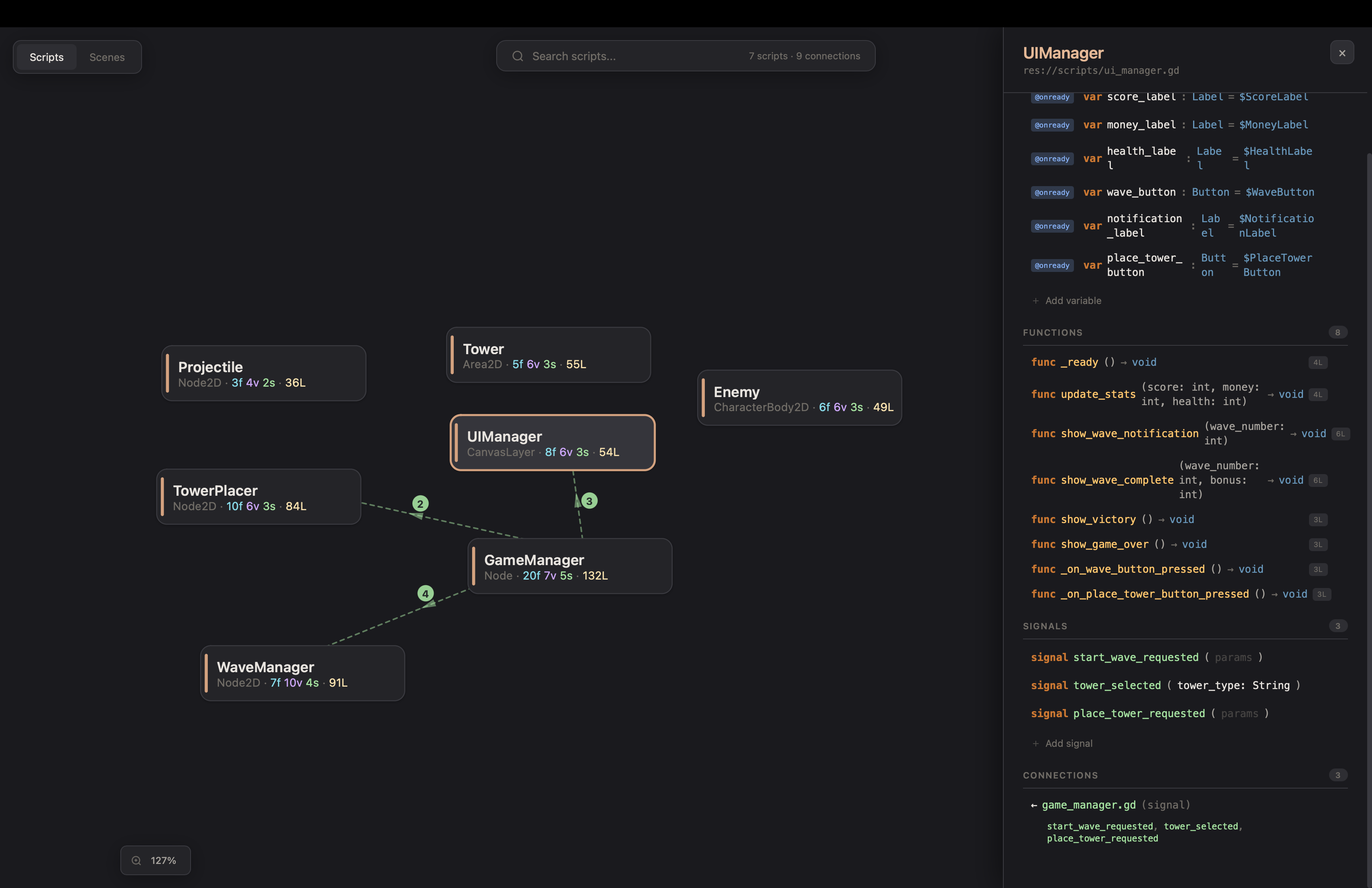
Interactive Visualizer
Run map_project and get a browser-based explorer at localhost:6510:
- Force-directed graph of all scripts and their relationships
- Click any script to see variables, functions, signals, and connections
- Edit code directly in the visualizer — changes sync to Godot in real time
- Scene view with node property editing
- Find usages before refactoring
🏗️ Architecture
┌─────────────┐    MCP (stdio)   ┌──────────────┐   WebSocket   ┌──────────────┐
│  AI Client  │◄────────────────►│  MCP Server  │◄─────────────►│ Godot Editor │
│  (Claude,   │                  │  (Node.js)   │   port 6505   │  (Plugin)    │
│   Cursor)   │                  │              │               │              │
└─────────────┘                  │  Visualizer  │               │  230 tool    │
                                 │  HTTP :6510  │               │  handlers    │
                                 └──────┬───────┘               └──────────────┘
                                        │
                                 ┌──────▼───────┐
                                 │   Browser    │
                                 │  Visualizer  │
                                 └──────────────┘
⚠️ Limitations
Written to be the section you read before hitting these, not after.
Requires a running editor. This drives a live Godot instance over a WebSocket; it is not a headless CLI. No editor open, no tools. Godot 4.5 or newer — 4.3 and 4.4 were measured against the live suite and the editor-mode scene path does not work there.
Local only, one editor at a time. Port 6505 on localhost, first come first served.
Two projects open at once means the second one loses; set GODOT_MCP_PORT on both the
server and the addon, or GODOT_MCP_PROJECT so the bridge refuses the wrong project
instead of silently driving it.
A closed scene is edited on disk, with no undo entry. When the scene is open
everything goes through Godot's undo history and Ctrl+Z works, including over a whole
batch_scene_edit. When it is closed there is no history to write to — use version
control. Many destructive tools take dry_run: true to preview first.
Enabling a toolset mid-session may not reach your client. Only core (37 tools) is
on by default. enable_toolset flips it server-side and the server does send
notifications/tools/list_changed, but several clients cache the tool list for the
whole session and never re-fetch — and then the newly enabled tools stay invisible until
you restart the client. If you know you want them, set
GODOT_MCP_TOOLSETS=runtime,debug (or all) so they are in the first list.
game_eval runs your snippet inside the running game. Code that does not compile is
caught in the editor before the game ever sees it. A snippet that fails at runtime —
dereferencing a freed node, calling a method that does not exist — halts the game under
the editor's attached debugger, and the call times out instead of returning an error.
That is the debugger, not the bridge: launch with run_scene({attach_debugger: false})
and the same bad snippet comes back as a result in ~18ms with the connection intact
(measured). The trade is stated in the tool description — no step-debugging, and
get_errors loses its Debugger>Errors source.
What has been measured, and when
Numbers rather than adjectives, all from 2026-09-03 against a 24,880-file project:
Every one of those is re-runnable: mcp-server/scripts/measure-tools.mjs for the
schema cost, scripts/measure-runtime-cost.gd for per-tool time and payload, and the
rest are assertions in the suites.
C# is scaffolding only. create_csharp_script writes a correctly-shaped file and
csharp_status tells you honestly whether this editor can run C# at all (a standard,
non-Mono build cannot). The language-server and debugger tools cover GDScript, not C#.
The blocker is upstream: Godot has no non-interactive way to generate the .csproj,
verified across four CI runs.
The AI still does not know Godot as well as you do. It struggles with complex UI layouts, compositing scenes, and some property manipulation. It cannot build a game on its own — it debugs, writes scripts, runs and inspects the thing, and keeps you company while you do. Feedback welcome.
🔧 Development
To build from source instead of using npm:
cd mcp-server
npm install
npm run build
Then point your AI client at mcp-server/dist/index.js instead of using npx.
📖 Release notes
Narrative write-ups of each release live in release-notes/ — latest is v1.2.1. For the full change history, see CHANGELOG.md.
🤝 Contributing
See CONTRIBUTING.md. Security issues: see SECURITY.md instead of opening a public issue.
📄 License
MIT