ProducerMCP
A Model Context Protocol (MCP) server for AI music generation using (FUZZ models) through the .
Power your agent
The publisher's own URL. Not a PlugMCP endpoint.
Host a copy with our keys and logs.
https://producer.mcp.acedata.cloud/mcpThe Claude button above opens Claude with the name and URL filled in. You still confirm it there.
claude mcp add --transport http io.github.acedatacloud-mcp-producer https://producer.mcp.acedata.cloud/mcpRun in a terminal.
{ "mcpServers": { "io.github.acedatacloud-mcp-producer": { "command": "npx", "args": [ "-y", "mcp-remote", "https://producer.mcp.acedata.cloud/mcp" ] } }}claude_desktop_config.json
Remote URL or a command on your machine? How the two installs differ
Run on PlugMCP
A new server you create. It is not this listing's official endpoint. Use the publisher install when you want their URL and their credentials.
LaunchFrom the publisher
A Model Context Protocol (MCP) server for AI music generation using (FUZZ models) through the .
MCP server for Producer/Riffusion AI music generation
Generate AI music directly from Claude, VS Code, or any MCP-compatible client.
The hosted endpoint is https://producer.mcp.acedata.cloud/mcp. Choose one route for the MCP client:
The hosted service advertises OAuth metadata and Dynamic Client Registration (DCR). DCR registers the client application; it is not an API key. OAuth signs you in and the client sends the resulting Bearer token; it may reuse or create an API credential for the account. Browser sign-in still requires an AceDataCloud account. The hosted service can be metered: review current service documentation and displayed pricing before a real operation. Do not configure both an OAuth login and a fixed Authorization header for the same server.
Customize → Connectors → Add custom connector, enter https://producer.mcp.acedata.cloud/mcp, select sign-in, and choose Register automatically if Claude asks how to register its OAuth client. Complete consent. Claude Desktop's local claude_desktop_config.json is a separate setup. Claude connector guide.claude mcp add --transport http --scope user producer https://producer.mcp.acedata.cloud/mcp, then claude mcp login producer. Check /mcp. Claude Code MCP guide.https://producer.mcp.acedata.cloud/mcp. For a project, merge the entry below into <project>/.cursor/mcp.json; for personal use, use ~/.cursor/mcp.json. Cursor MCP guide.https://producer.mcp.acedata.cloud/mcp, then finish the browser sign-in. New portable workspace configs use <project>/.mcp.json; the VS Code-specific format below uses <project>/.vscode/mcp.json or the user profile. Check MCP: List Servers. VS Code MCP setup.codex mcp add producer --url https://producer.mcp.acedata.cloud/mcp, then codex mcp login producer. Its user settings are in ~/.codex/config.toml. Official Codex MCP guide.Cursor project config (OAuth):
{
  "mcpServers": {
    "producer": {"url": "https://producer.mcp.acedata.cloud/mcp"}
  }
}
VS Code-specific workspace config (OAuth):
{
  "servers": {
    "producer": {"type": "http", "url": "https://producer.mcp.acedata.cloud/mcp"}
  }
}
Bearer . An API Key / API Token field expects this raw value; only a manually configured HTTP Authorization header needs the Bearer prefix. A platform-... account-management token cannot replace a generation API key.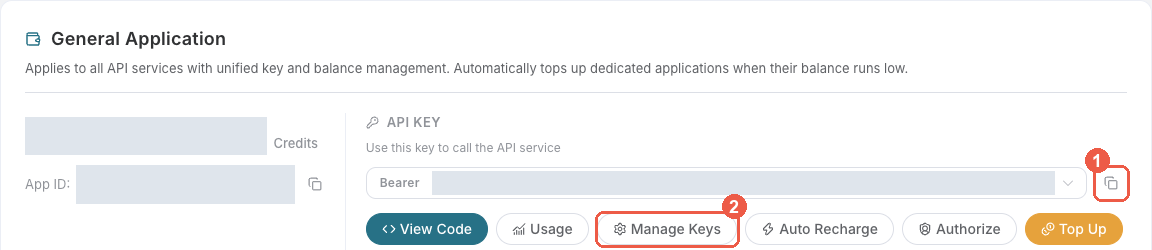
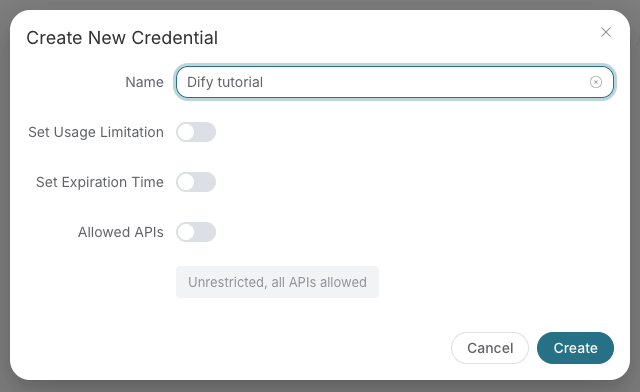
Save the key in the client's credential store or the environment variable shown below. Never put it in a prompt, shared workflow, screenshot, or Git commit. If authentication fails, check the full copied value, application/service access, expiration, usage limit, and balance before creating another key.
A fixed Bearer header bypasses OAuth. If the header is invalid, remove it before trying browser sign-in; keep the saved credential private.
For Claude Code, the shell expands the token when you add the server; treat the saved user MCP config as a secret:
export ACEDATACLOUD_API_TOKEN='YOUR_API_TOKEN'
claude mcp add --transport http --scope user producer https://producer.mcp.acedata.cloud/mcp \
  --header "Authorization: Bearer $ACEDATACLOUD_API_TOKEN"
For a Claude Code project config, put a variable reference in <project>/.mcp.json and set that variable in the environment that launches Claude Code:
{
  "mcpServers": {
    "producer": {
      "type": "http",
      "url": "https://producer.mcp.acedata.cloud/mcp",
      "headers": {"Authorization": "Bearer ${ACEDATACLOUD_API_TOKEN}"}
    }
  }
}
Cursor uses a different environment-variable syntax in ~/.cursor/mcp.json or an uncommitted project config:
{
  "mcpServers": {
    "producer": {
      "url": "https://producer.mcp.acedata.cloud/mcp",
      "headers": {"Authorization": "Bearer ${env:ACEDATACLOUD_API_TOKEN}"}
    }
  }
}
In VS Code, run MCP: Open User Configuration and merge this server plus its masked input; ${input:...} is for VS Code's user/workspace format and is not portable to the Agent Host .mcp.json format:
{
  "inputs": [
    {"id": "acedata-producer-token", "type": "promptString", "description": "AceDataCloud API token", "password": true}
  ],
  "servers": {
    "producer": {
      "type": "http",
      "url": "https://producer.mcp.acedata.cloud/mcp",
      "headers": {"Authorization": "Bearer ${input:acedata-producer-token}"}
    }
  }
}
For Cline, use its MCP configuration UI or CLI file ~/.cline/data/settings/cline_mcp_settings.json; its remote transport value is streamableHttp. For JetBrains AI Assistant, add a remote URL from Settings → Tools → AI Assistant → Model Context Protocol (MCP). For Zed, use a context_servers entry with the URL only for OAuth or add a local Bearer header. These clients have different configuration schemas; follow their current UI rather than copying another client's JSON. Cline · JetBrains · Zed.
Install the package and give the local process an API token:
python -m pip install mcp-producer
export ACEDATACLOUD_API_TOKEN='YOUR_API_TOKEN'
mcp-producer
For Claude Desktop local MCP, merge this entry into the file opened by its developer settings (~/Library/Application Support/Claude/claude_desktop_config.json on macOS). uvx requires uv on PATH:
{
  "mcpServers": {
    "producer": {
      "command": "uvx",
      "args": ["mcp-producer"],
      "env": {"ACEDATACLOUD_API_TOKEN": "YOUR_API_TOKEN"}
    }
  }
}
Keep this user-level file private. Self-hosted HTTP uses mcp-producer --transport http --port 8000; expose it only with suitable network and TLS controls. Local execution still calls the AceDataCloud API.
https://producer.mcp.acedata.cloud/health returning {"status":"ok"} checks endpoint reachability only.producer_list_models is a reference tool; it does not verify downstream API access or balance.producer_generate_music with your own valid input after reviewing current service documentation and displayed pricing. If the result contains a task ID, call producer_get_task on that same ID until terminal success or failure. Do not resubmit the operation just to check progress.For 401, check which auth route the client used and whether the token or OAuth session is valid. A 403 may mean an account permission or content moderation failure; read the returned error. Insufficient balance and downstream service failures need their own diagnosis. A listed tool or submitted task does not prove a successful result.
User: Create a jazz song about rainy nights

Claude: I'll generate a jazz song for you.
[Calls producer_generate_music with prompt="Smooth jazz song about rainy nights, saxophone, piano, moody"]
User: Here are my lyrics:
[Verse] Walking in the rain...
[Chorus] But I keep moving on...

Claude: I'll create a song with your lyrics.
[Calls producer_generate_custom_music with lyrics, title, and prompt]
User: Make this song longer with another verse

Claude: I'll extend the song from where it left off.
[Calls producer_extend_music with audio_id, continue_at, and new lyrics]
User: Make an acoustic version of this song

Claude: I'll create an acoustic cover.
[Calls producer_cover_music with audio_id and prompt="acoustic folk, gentle guitar"]
mcp-producer --help

Options:
  --version          Show version
  --transport        Transport mode: stdio (default) or http
  --port             Port for HTTP transport (default: 8000)
# Clone repository
git clone https://github.com/AceDataCloud/ProducerMCP.git
cd ProducerMCP

# Create virtual environment
python -m venv .venv
source .venv/bin/activate  # or `.venv\Scripts\activate` on Windows

# Install with dev dependencies
pip install -e ".[dev,test]"
# Run unit tests
pytest

# Run with coverage
pytest --cov=core --cov=tools

# Run integration tests (requires API token)
pytest tests/test_integration.py -m integration
# Format code
ruff format .

# Lint code
ruff check .

# Type check
mypy core tools
# Install build dependencies
pip install -e ".[release]"

# Build package
python -m build

# Upload to PyPI
twine upload dist/*
ProducerMCP/
├── core/                   # Core modules
│   ├── __init__.py
│   ├── client.py          # HTTP client for Producer API
│   ├── config.py          # Configuration management
│   ├── exceptions.py      # Custom exceptions
│   ├── oauth.py           # OAuth 2.1 provider
│   ├── server.py          # MCP server initialization
│   ├── types.py           # Type definitions (models, actions)
│   └── utils.py           # Utility functions
├── tools/                  # MCP tool definitions
│   ├── __init__.py
│   ├── audio_tools.py     # Audio generation tools (9 tools)
│   ├── lyrics_tools.py    # Lyrics generation
│   ├── media_tools.py     # Upload, video, WAV tools
│   ├── task_tools.py      # Task query tools
│   └── info_tools.py      # Information tools
├── prompts/                # MCP prompts
│   └── __init__.py        # Prompt templates
├── tests/                  # Test suite
│   ├── conftest.py
│   ├── test_client.py
│   ├── test_config.py
│   ├── test_integration.py
│   └── test_utils.py
├── deploy/                 # Deployment configs
│   └── production/
│       ├── deployment.yaml
│       ├── ingress.yaml
│       └── service.yaml
├── .env.example           # Environment template
├── .ruff.toml             # Ruff linter config
├── CHANGELOG.md
├── Dockerfile             # Docker image for HTTP mode
├── docker-compose.yaml    # Docker Compose config
├── LICENSE
├── main.py                # Entry point
├── pyproject.toml         # Project configuration
└── README.md
Contributions are welcome! Please:
git checkout -b feature/amazing)git commit -m 'Add amazing feature')git push origin feature/amazing)MIT License - see LICENSE for details.
Made with love by AceDataCloud
© 2026 MCP Directory.
MCP server for Producer/Riffusion AI music generation
{ "mcpServers": { "io.github.acedatacloud-mcp-producer": { "url": "https://producer.mcp.acedata.cloud/mcp", "headers": {} } }}Tools
No tool list yet. Remote servers get one after the first health check.
FAQ
Copy the http config for Cursor, Claude Desktop, Claude Code, or VS Code on this page. It uses the publisher's install, not a PlugMCP proxy.
The publisher lists these environment variables: ACEDATACLOUD_API_TOKEN.
MCP Producer is reached over HTTP.
Last checked 2026-11-15. MCP server for Producer/Riffusion AI music generation
